
Nissan, Consult III
Consult III plus, installed on your laptop for 250 USD
One remote session and the software is yours. No Nissan subscription, no per car fee, and no limit on how often you use it.
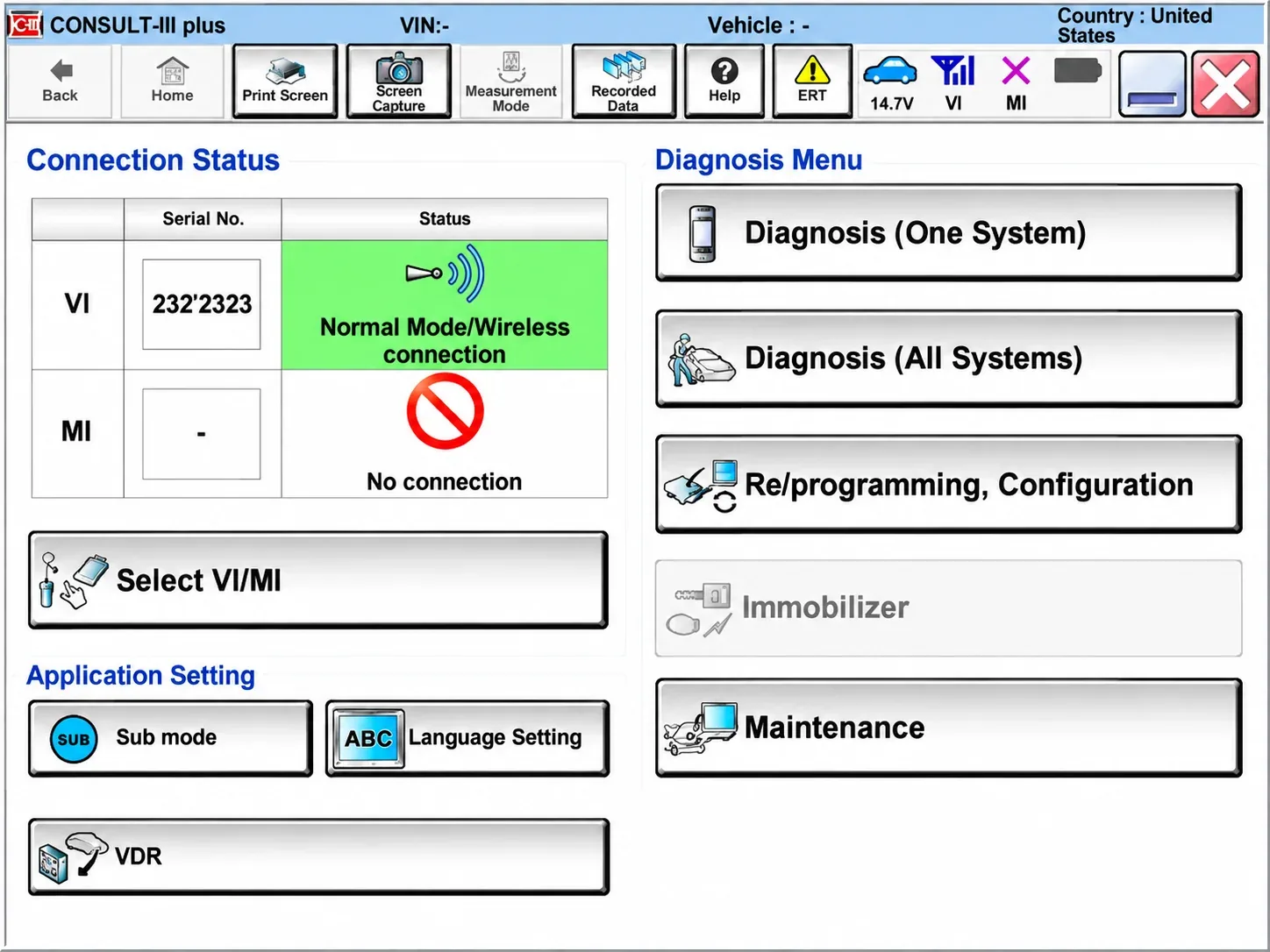
The Consult III plus home screen. This is the software you will be working in, running on your own laptop.
What it costs
Paid once, then it is yours
250 USD
The software installed on your machine and licensed to you, with nothing recurring behind it.
Unlimited use, no expiry and no credits to top up
No Nissan subscription to pay, ever
PIN codes pulled from Nissan online, automatically
For comparison, Nissan charges 55 USD for a 24 hour pass on their own subscription. Five of those cost more than owning Consult III outright, and you would still be renting it.
Coverage
Models we cover on Consult III plus
These are the generations that come through this desk every week. If your car is not on the list, send the VIN and we will tell you either way.
2019 to 2025
The whole B18 generation, start to finish.
2020 to 2026
The T33 generation. From 2025 a small number of high trim Rogues, around five per cent, sit on Consult IV instead.
2020 to 2026
The R53 generation. Tested and proven up to 2025. The 2026 cars are not tested yet.
2021 to 2026
Tested and proven up to the 2025 models.
Altima, Kicks and Frontier
Altima up to 2026, Kicks up to 2025, Frontier and the others in the range.
Send us the VIN first
A handful of cars sit on Consult IV rather than Consult III. Send the VIN before you commit and we will tell you which side of the line yours falls on.
Why locksmiths buy it
What you actually get out of it
Six reasons this ends up on most Nissan locksmiths' laptops.
No subscription, ever
Nissan want 55 USD for 24 hours of access. Once Consult III is on your laptop, that number stops mattering.
Unlimited use
No credits, no per car charge and no expiry date. Run it as often as the work comes in.
No dash stripping
You are not pulling the fuse box and the BCM out to reach a 40 pin connector. Nobody enjoys doing that with the customer standing over them.
It pays for itself
One proper all keys lost job usually covers the whole 250 USD. After that it is profit on every Nissan that comes in.
All keys lost in about five minutes
On most cars the job runs start to finish in under five minutes. The videos on this site are real jobs, not demos.
No gambling with proximity
The factory route does not put the customer's smart entry at risk. You hand the car back exactly as it arrived.
The honest comparison
Why the 40 pin cable is a gamble
Most aftermarket programmers read the PIN through a 40 pin cable into the BCM. It works, until it does not. Two things go wrong often enough to matter.
Roughly one Nissan in ten loses proximity
The HFM can be damaged during the read. That is the HFM, not the BCM, and the customer loses their smart entry functions. You will know straight away: EEPROM Error and Config Error stored against the HFM module.
Some cars will not give the PIN at all
Newer Rogues in particular, 2024 and 2025, simply will not hand the PIN over the 40 pin cable. The fallback is removing the HFM and reading the RH850 directly. It is slow, fiddly work that turns a short job into an afternoon.
Interfaces
Interfaces that work with it
If you already own one of these, you are ready to go. Tell us which when you book.
Rlink J2534, X7 and Lite
Best value for money, and future proof: the same interface covers Consult IV cars too, so you are not buying twice.
CarDAQ-3, AEZ Flasher 3, Snap-on 4
Well proven boxes that plenty of shops already have on the bench.
Mongoose Plus and Supergoose Plus
All the Mongoose Plus variants are supported, along with Supergoose Plus.
Launch SmartLink C
Supported. Tell us the exact model and we will load the right driver during the install.
Before we start
What you need on your side
Windows 7, 8, 10 or 11
64 bit, with admin rights. Any of those four versions is fine.
A solid internet connection
Plus UltraViewer or AnyDesk installed, so we can take the session with you.
Your J2534 interface
Whichever box you run, with its cable to hand before the call starts.
A car for the live test
We do not sign the install off until it has read a real car in your shop.
We also need your locksmith licence or business registration before we activate anything.
The session
What happens on the call
Plan for about two hours. Most of it is download time, so you can carry on working while it runs.
Laptop check
We look at Windows version, disk space and antivirus, and tell you before we start if the machine is going to fight us.
Install and licence
Software installed, the driver for your interface loaded, licence activated and tied to your machine.
Live test
We connect to a car in your shop, read the immobiliser and confirm the PIN function works. No test, no sign off.
Walkthrough
We run your first key job with you, then leave you notes on the menu path so you are not hunting for it next week.
Questions
The questions we get asked most
Can I use the software without a subscription?
Yes. Once it is on your laptop there is nothing to renew and nothing more to pay, to Nissan or to us.
When does the software expire?
It does not. Technically its life is the life of your laptop.
Can I use more than one VCI?
Yes. Run whichever interfaces you own, and as many of them as you like.
Which models are supported?
The generations listed further up this page. If your car is not there, send the VIN and we will check it for you.
Do you help if I get stuck?
Yes, and at any hour. We are locksmiths ourselves at the end of the day, same as you, and that does not change once you have paid.
We will sit with you on your first job
The install is not where we leave you. When your first Nissan comes in, say the word and we will take the session with you and run it together. No extra charge.